
How to Increase Website Speed for Better Performance ?
You publish a page on your website. You spend time writing the content, adding images, and making the page look good. Then you wait for people to find it on Google.
But weeks pass, and the page receives very little traffic.
What went wrong?
Sometimes the problem is not the topic. The page may simply need better structure, clearer content, stronger headings, useful links, or a title that explains what the page is actually about. That is where on-page SEO comes in. If you are searching for what is on-page SEO, the simple answer is this: on-page SEO means improving the content and elements of a web page so users can understand it easily and search engines can understand what the page is about.
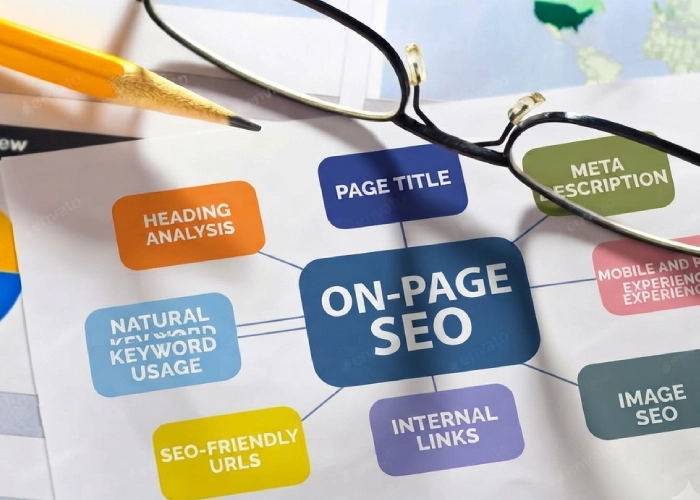
It includes your title, headings, content, keywords, URLs, images, internal links, and overall page experience.
The goal is not to fill a page with keywords. The goal is to create a page that genuinely helps the person who searched for it.
What Does On-Page SEO Mean?
On-page SEO focuses on the things you can improve directly on an individual web page.
Think about a service page called:
Our Services- It does not tell the visitor very much.
Now compare it with:
Website Design Services in Pondicherry
The second title immediately gives the visitor more information. They know what service the company offers and where it is available.That is a simple example of on-page optimization. Good on-page SEO removes confusion. A visitor should not have to guess what your page is about.
Why Is On-Page SEO Important?
When someone searches on Google, they expect to find an answer that matches what they are looking for.
Your page should make four things clear:
What is this page about?
Who is it for?
Does it answer the user’s question?
Is it easy to use?
On-page SEO helps you improve these areas. It also gives search engines clearer information about your page. However, good optimization does not mean adding the same keyword everywhere. A well-optimized page should still sound natural when a real person reads it. That is an important difference.
Important On-Page SEO Factors
There are many things you can optimize, but beginners do not need a checklist with hundreds of items.
Start with the areas that make the page clearer and more useful.
1. Page Title
Your page title should clearly describe what the page is about.
For example:
Weak: SEO Tips
Better: SEO Tips for Small Business Websites
The second option gives the reader a clearer idea of what they will find. Keep your title descriptive and natural. Do not add words simply because you want another keyword in the title.
2. Meta Description
A meta description gives users a short summary of the page. It may appear beneath your title in search results.
For example:
Learn the main on-page SEO factors and simple steps to improve your titles, content, links, URLs, and images. The description should tell the reader what they can expect from the page. Avoid writing something vague such as: Visit our website to learn more. Give the user a real reason to click.
3.H1 Heading
The H1 is normally the main visible heading of the page. It should clearly explain the main topic.
For this page, the H1 is:
What Is On-Page SEO? A Complete Guide for Beginners A visitor can immediately understand what they are going to learn. That is exactly what a good H1 should do.
4. H2 and H3 Headings
Long pages become much easier to read when the content is divided into clear sections. People often scan headings before deciding which section they want to read. Clear headings help them find the information faster.
5. Useful Content
Good SEO content should answer the question that brought the visitor to the page.
Imagine someone searches: how to optimize website images
They probably want to learn about:
1. File size
2. File names
3. Image dimensions
4. Alt text
5. Compression
6. Natural Keyword Usage
Keywords help search engines and users understand the subject of a page. But they should fit naturally.
For this guide, related terms include:
on-page SEO factors, on-page optimization, search intent, internal linking, image SEO, and on-page SEO checklist.
You do not need to repeat one phrase in every paragraph. If a sentence sounds strange because you added a keyword, rewrite it. Good content should still sound like something a person would actually say.
7. SEO-Friendly URLs
Your URL should be simple and descriptive.
For example:
example.com/blog/on-page-seo/
is easier to understand than:
example.com/page?id=76492
A visitor can look at the first URL and immediately get an idea of what the page contains. Avoid unnecessary numbers, random characters, or words that do not add meaning.
8. Internal Links
Internal links connect different pages on your own website.
For example, if an article mentions website design, you may link to your website design service page. If you mention technical SEO, you may link to a detailed technical SEO guide. Internal links make it easier for users to find related information.
They can also help search engines discover pages and understand how content on your website is connected. Do not add links just to increase the number of links on the page. Add them when they genuinely help.
9. Image SEO
Images can improve a blog, product page, or service page, but large or poorly prepared images can also create problems. Start with a clear filename.
Instead of: IMG54892.jpg
use: on-page-seo-checklist.jpg
Also use descriptive alt text that explains what the image shows. Google states that alt text helps provide information about images and also improves accessibility for people who use screen readers or cannot see the image. Keep the description useful. Do not turn alt text into a list of keywords.
10. Mobile and Page Experience
A page that looks perfect on a laptop can still be difficult to use on a phone. Always check the actual page on mobile.
Look at:
Text size
Button size
Images
Navigation
Spacing
Loading
Popups
Final Thoughts
So, what is on-page SEO?
It is about making each page easier for people to understand, easier to use, and clearer for search engines. If you are just starting, do not try to fix everything at once.
Start with three actions.
First, understand the search intent. Check what the visitor really wants from the page.
Second, improve the page itself. Review the title, headings, content, links, URL, and images.
Third, test it like a real visitor. Open the page on your phone and see whether you can quickly understand the content and find what you need. Then move to the next page.
A simple, useful page built for real people is a much better starting point than a page created only to satisfy an SEO score.
Frequently Asked Questions
What is on-page SEO in simple words?
On-page SEO means improving a web page so users can easily understand it and search engines can understand the topic and content of the page.
What are the most important on-page SEO factors?
Important factors include useful content, titles, headings, search intent, keywords, URLs, internal links, images, and mobile usability.
Can on-page SEO improve rankings without backlinks?
Yes, especially for less competitive searches. More competitive topics may also need backlinks, authority, technical SEO, and stronger supporting content.
How long does on-page SEO take to show results?
There is no fixed timeline. Search engines need time to crawl and process changes, while competition and website authority can also affect results.
Should I update old blogs for on-page SEO?
Yes. Update an old article when the information becomes outdated, search intent changes, parts of the article become unclear, or you have useful information to add.
Is keyword density important for on-page SEO?
You do not need to target a fixed keyword percentage. Use your main and related keywords naturally while keeping the content useful and readable.